
Oracle SQLcl Part 2
Using SQLcl DDL command to fetch DDL for Database Objects.….
In part one of my post about SQLcl I voiced my opinion that SQLcl is a powerful command-line tool that brings a wide range of capabilities to both DBA’s and Developers. This second part dives into one of those capabilities that will be appreciated by both DBA’s and Developers.
– How to make use of SQLcl and quickly extract DDL for database objects.
If you have ever needed the DDL for a database object, you already know there are several ways to get it.
Some are slower, i think thats mainly because one needs to write longer and more complex sql statements or command line commands. Some require a GUI, and some demand more setup than the task really deserves.
Below is a quick recap of some of the options I tend to use to achieve the task at hand.
- Export Wizard in SQL Developer – This option is easy to use but as far as I know yet only available in the Client Build of SQL Developer.
You point and click your way through the wizard, select your objects, and export the DDL. It works well but requires the full SQL Developer GUI and several clicks to get there. One good feature is that one might divide the DDL export into different files based on type of object (SEQUENCES, TABLES, VIEWS and so on) to export - DBMS_METADATA.GET_DDL – This is an oracle package dedicated to DDL extraction. Using this approach is flexible and scriptable, but as I seldom use this approach I most of the time must look up the specific syntax. Getting only the DDL for a specific object, a table or an index is quite easy but if I want to extract DDL for more objects in one go then the SQL will be a bit more complex.
- Data Pump Export with CONTENT=METADATA_ONLY — This option I really like and is a solid option when you need DDL for larger sets of objects or a full schema. The downside is that it generates a dump file you then must import or inspect, which adds steps when maybe you just want to have a quick look at the DDL.
A real-world scenario — the DDL is nowhere to be found
On a couple of occasions, I have certainly been in situations where the DDL scripts were never saved or not maintained since the first release, meaning new columns or new indexes might have been added ad-hoc, maybe during a late-night incident fix or for other reasons. The only place to find the truth has been the database,
and that might also be a good thing – the database contains the actual truth. The database itself becomes the source of truth — whether that is intentional or not.
So, when you need to extract the DDL what option of the ones available are you going to use?
When it comes to fetching DDL for a large set of objects or the whole database or a schema I still tend to use Datapump Export and only export the metadata or building a bash script using SQL and calls to DBMS_METADATA.GET_DDL. But in many cases the SQLcl command DDL would have provided all the information needed. With just a few keystroke I can get needed DDL rapidly, specially if the DDL for only a couple of specific objects are needed. There aren’t so many times I need the DDL’s for a full schema but for sure a couple of times weekly I need the DDL for specific objects and the SQLcl command comes in very handy, regardless of if the DDL scripts are saved or not. It’s a lot faster to fetch DDL from the database then to head over to the script repository and struggle to find the correct release.
For quick, targeted DDL retrieval, it is in my opinion one of the most practical commands in the SQLcl toolkit — simple, reliable, and always pointing at the actual truth.
Here are a couple of examples to illustrate how straightforward the command is in practice.
Fetching the DDL for the table “INVOICES” including indexes. So here we get the table ddl and the ddl for the indexes with one simple command.
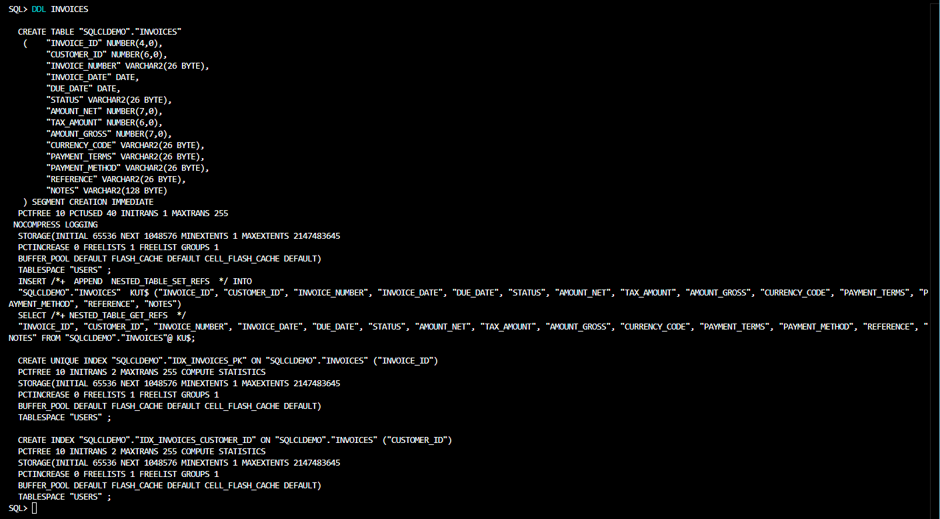
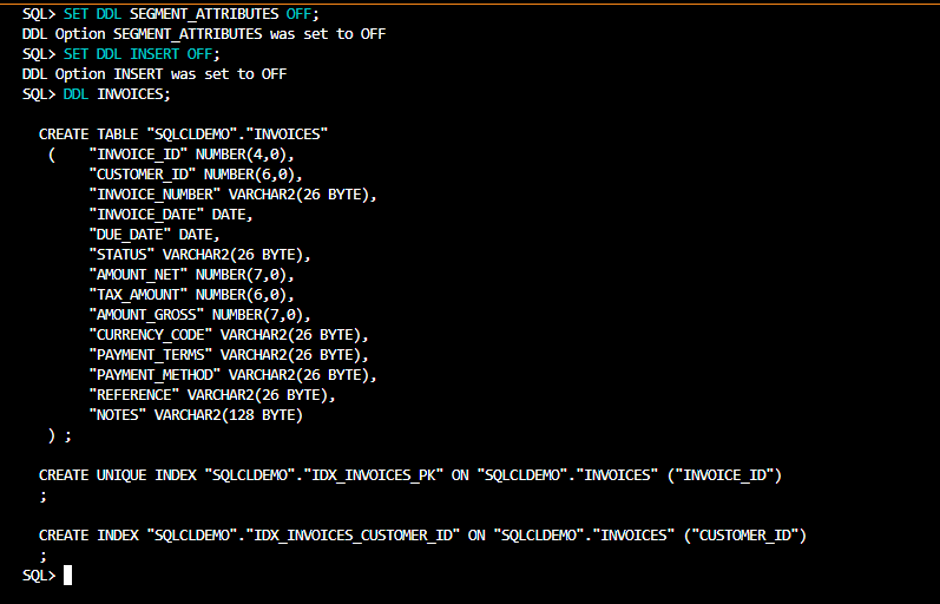
By default, SQLcl outputs the create table statement with storage parameters and as you can see the insert statement was included as well. If you want a cleaner output you can tweak that with:SQL> SET DDL SEGMENT_ATTRIBUTES OFF;SQL> SET DDL INSERT OFF;
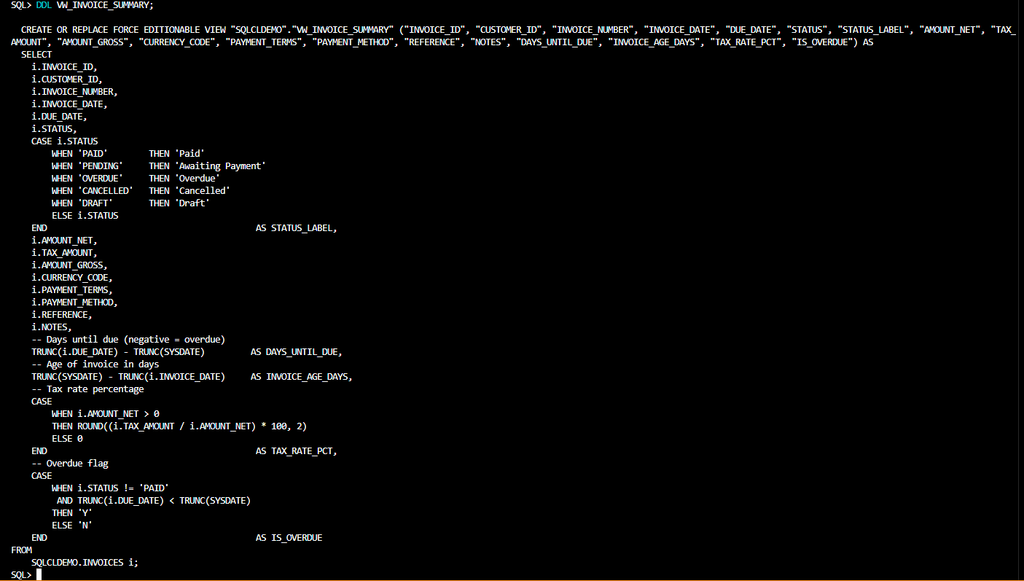
Below is an example fetching the DDL easily for a view.
That was a quick look at the SQLcl DDL command. Hope you found it useful and give it a try your self next time you need a fast and reliable way to fetch DDL from your database.