
Oracle Skills – Part #1
As a DBA, why should I care? And how do I get Started?…..
Imagine you are on call, at 02:14 the database suddenly becomes unresponsive. By the time the first notice reaches you and you have dragged yourself out of sleep and started your PC – 4 critical financial batches importing invoices already failed. Users are going to notice this at 07:00. The first notice you get doesn’t inform you batches failed, the only information you have is that the database is not responding, that’s it.
So the first thing you do is information gathering, is the server responding, can you login, is the database up and running? Well, the usual 20 minutes of context-gathering you always do. What if the alert that went off already triggered this information-gathering to happen, before you even opened the PC?
That’s twenty minutes you don’t have to spend – and possibly the difference between a fix before 07:00 and a morning spent answering support tickets.
This is where skills come in — specifically, the Official Oracle Skills repository.
I’ve been playing around with Oracle Skills for a couple of months now, and even though I haven’t put them into a production system yet, using them in test environments and for building my own database and application management tools, skills have really upped my game.
Skills – What are they?
Skills are pretty much exactly what the names says they are – a set of instructions acting as structured guidance for AI agents. “A Manual for the AI Agent”. They have a name, a description of when they should be used and what they’re used for. And of course, a body of instructions. A skill will tell AI how to do Oracle things correctly. Skills are written as plain text files, using a formatting convention called Markdown (hence the .md extension in SKILL.md), in natural language. The very top of the file is often a small block written in YAML called the frontmatter — it holds the structured metadata.
Any AI agent can be used together with a skill, as long as it supports the SKILL.md specification.
Skills – Why we should use them?
None of the below benefits are specifically tied to the on-call scenario I opened with but I’ll come back to that in later posts.
But these are the benefits I personally like the most.
– Less token consumption and less time. The AI agent doesn’t have to come up with a query — it uses one from the skill repo and executes it via an MCP.
– Consistency. The same task uses the same query every time.
Without skills, the AI might come up with a different query the next time around and get slightly different results.
– No hallucinated SQL. The queries in the repo were written by people who actually know the Oracle data dictionary.
You’re not going to get a query against a view that doesn’t exist, or the wrong join on v$session. When AI doesn’t know the answer,
it will not say “I don’t know” it will come up with something that looks right — and might not be.
– Better control over what the AI runs against the database.
Everything executed in the database using AI has already been verified — assuming we’ve checked the skill library ourselves.
– You can write your own skills to instruct the AI in more detail — which is where this gets really interesting, more on that later.
The Official Oracle Skills repository.
The Official Oracle Skills repository shipped in early 2026, covering DB, OCI, GraalVM, APEX, Fusion, and others.
From what I’ve been able to piece together, the repo was mainly driven by Kris Rice, with contributions from Oracle teams. It started as his personal repo (krisrice/oracle-db-skills) and was later promoted to the official oracle/skills project.
The Oracle Skills are licensed under UPL (Universal Permissive License, v1.0), which means you can fork, modify, and add your own without asking anyone — as long as you keep the original copyright notice and the UPL reference intact.
The Oracle Skill set can be found at: https://github.com/oracle/skills
Oracle also welcomes contributions to the repository. There are multiple ways to contribute, each with specific instructions to follow. If you want to contribute your own code, read the instructions at Contributing to this repository
A word of caution: This is a new repository, and even though it’s built and maintained by Oracle professionals who know what they’re doing, when it comes to AI you should never run anything against your database without checking for yourself what it actually does.
Oracle Skills – How to get Started
There are multiple ways to install the Oracle Skills: npm install which stands for Node Package Manager (ships with node.js), a manual git clone, the Codex CLI installer for developers using OpenAI’s Codex, and — probably the easiest — installing directly from SQLcl if you’re on version 26.1.2 or higher. The SKILLS command is native in SQLcl since 26.1.2 and requires no Node.js, no git, and no npm. It uses SQLcl’s own machinery, and a single skills sync is all you need.
The main difference between the SQLcl route and the npm route is scope: SQLcl’s skills sync only installs Oracle’s own skill set but drops it into every agent SQLcl detects on your box in one command. The npm route lets you install any skill repo (Oracle’s, Postgres, Tomcat, your own private ones) and gives you remove and nuke commands to tidy up afterwards — but it targets one agent at a time.
I lean toward npm myself, mostly because removing a single skill set without touching the others feels cleaner. Most DBAs will probably end up using both: SQLcl sync for the Oracle stuff, npm for everything else.
In this post we’ll walk through both — the SQLcl route first, then npm:
Everything in this post is done on Linux. I’m using Oracle Database 26ai Free (no account required, just download and run), Claude Code, and SQLcl, all on Linux. If you want to follow along, the Free edition and every other tool mentioned will cover everything demonstrated here. Production or commercial use is a different story — make sure you’re properly licensed.
This post covers the mechanics — installation, first look at what’s in the repo, and how to invoke skills. Actually showing skills work through the 02:14 scenario is for the next post; here we’re getting the plumbing in place first.
SQLcl:
One thing to know before starting: the native skills command in SQLcl requires Java 17 or higher.
As usual we start with the help section:
$ sql /nolog
SQL> help skills
Manages SQLcl DBTools skills.

Subcommands:

  LIST
  Lists available DBTools skills.

  Usage:
    list|ls {OPTIONS}

  Options:

    -debug|-de
    Prints debug output.

    -verbose|-v
    Prints verbose progress output.

  SYNC

  Synchronizes the Oracle DBTools skills repository.

  <--- The rest of the help section has been truncated --->
Let’s go on and list already available Oracle Skills.
SQL> skills list

WARN: No local DBTools skills repository found. Run skills sync to synchronize it.
So, we have no skills. Let’s go ahead and install them, or to be correct synchronize them.
SQL> skills sync
SUCCESS: Synchronized DBTools skills repository to /home/oracle/.dbtools/skills/repositories/oracle-skills version latest
(refs/heads/main -> b0afa3bfd7c7e3547458d7fe52649ab1b59706b7).
SUCCESS: Installed 20 entries into agent skill locations.
SUCCESS: DBTools skills sync log:
/home/oracle/.dbtools/skills/logs/skills-sync-20260921T104054.560Z.log

-- Let's also check the directory where the skills should be located.
SQL> !ls -l /home/oracle/.dbtools/skills/repositories/oracle-skills
The skills will also be found under /home/oracle/.agents and under /home/oracle/.<agent name> depending on what agents are installed and in use.
Let’s list the skills again from SQLcl:
SQL> skills list

+========+===========+=================================+
+ Skill  + Status    + Agents                          +
+========+===========+=================================+
| apex   | INSTALLED | claude-code, cline, dexto, warp |
+--------+-----------+---------------------------------+
| db     | INSTALLED | claude-code, cline, dexto, warp |
+--------+-----------+---------------------------------+
| fusion | INSTALLED | claude-code, cline, dexto, warp |
+--------+-----------+---------------------------------+
| graal  | INSTALLED | claude-code, cline, dexto, warp |
+--------+-----------+---------------------------------+
| oci    | INSTALLED | claude-code, cline, dexto, warp |
+--------+-----------+---------------------------------+
From the above we can see we have all skills from the Oracle Skills Repository available.
A quick note on this output: I think — though I haven’t seen this documented — that the “Agents” column shows which agents each skill supports, not which agents you actually have installed. On my box only Claude Code is installed, and only ~/.claude/skills/ and ~/.agents/skills/ got files written, despite the list saying claude-code, cline, dexto, warp. To confirm what’s actually on disk, use ls ~/.claude/skills/ or find ~ -name “SKILL.md” 2>/dev/null.
But we can also choose to only install one or multiple parts from the repo specifying the skill name we want. Like in the example below.
SQL> skills sync –skill-name db,apex		# for multiple skills
SQL> skills sync –skill-name db 		# for one skill
SUCCESS: Synchronized DBTools skills repository to /home/oracle/.dbtools/skills/repositories/oracle-skills version latest
(refs/heads/main -> b0afa3bfd7c7e3547458d7fe52649ab1b59706b7).
SUCCESS: Installed 0 entries into agent skill locations.
WARN: Skipped existing skill entries: /home/oracle/.agents/skills/db, /home/oracle/.agents/skills/db, /home/oracle/.agents/skills/db, /home/oracle/.claude/skills/db
SUCCESS: DBTools skills sync log: /home/oracle/.dbtools/skills/logs/skills-sync-20260921T105934.061Z.log
Well, the skills are already there so no work to perform.
npm: (npx)
We are going to use npx to add the skills which is a helper shipped with npm.
For this we first need to install node.js as because it includes npm. We will also need git. Let’s install those two packages.
$ dnf install nodejs
$ dnf install git -y

# Verify we have at least version 20 of node.js, if we are on version 10, it will not work.
$ node -v
v20.20.2
Let’s install the Oracle Skills.
In below example I am providing commands on how to add skills, list skills and remove.
# Use -g to make the skill available globally, drop the -g to scope it to only current directory.
# Use -a and the name of the agent to specify a specific agent to add, not specifying the name will add multiple agents.

# Add only db skills for claude code
$ npx skills add oracle/skills/db -g -a claude-code

# Add all oracle skills for multiple agents
$ npx skills add oracle/skills

# List all skills
$ npx skills list

# Remove skills interactively
$ npx skills remove

# Remove skills by name, one or several at once
$ npx skills remove db [,oci]

# Remove globally instead of just the current directory
$ npx skills remove --global db

# Remove all skills, no prompts
$ npx skills remove --all -y
Simple Use Case:
Everything that has been done up to now has been preparations, but now when we know how to add skills we can go ahead and put them to work.
I have first configured $HOME/.claude.json to instruct claude it should run sqlcl in MCP mode when needed. I’ve also prepared a couple of named connections
that can be used in SQLcl.
Claude is quite talkative so in the examples shown below I have with intention of keeping it simple and short truncated a lot of the noise
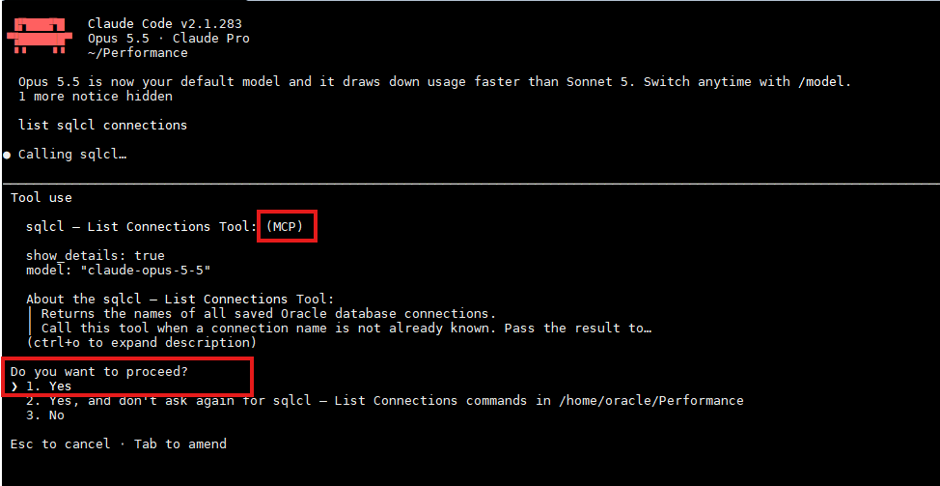
Claude is answering with the tool that will be used to pull connections and also that MCP Server is in use. We are not running Claude in auto-mode so it will will ask us to confirm for every action it suggests. Please make it a habit to run with auto-mode off.

I now want to know if Oracle Skills are available to Claude, just go ahead and ask.
> What skills are available?

These are the skills available in this Claude Code session:
Code and review
- code-review: reviews the current diff, a PR or a branch for bugs, at levels from low to ultra.
- simplify: cleans up changed code for reuse, simplicity and efficiency, then applies the fixes.

Claude Code setup
- update-config: changes settings.json for permissions, hooks and environment variables.

None of these skills are specific to Oracle or SQLcl. The SQLcl MCP servers do have a separate skills_sync tool. I haven't run it; tell me if you want me to see what it offers.
This box has no Oracle Skills added yet so i will ask Claude to add them, i could use the native SQLcl command or git clone, but i’ll go for npx path.
> run host command : npx skills add oracle/skills/db -a claude-code
Installing Oracle db skills for claude-code

Do you want to proceed?

The db skill from oracle/skills installed without errors.

- Where it went:
it's in ~/Performance/.claude/skills/db, so it's available only in this project.
The installer also left a copy in ~/Performance/.agents/skills/db.
- What it covers:
guidance on Oracle Database SQL, PL/SQL, SQLcl, ORDS, tuning (AWR, ASH, execution plans, waits and locks), administration, security, migrations, and Oracle's vector database.

A restart of Claude is needed to read the new skills.
So, in this small example Claude, with the use of Oracle Skills are going to help us with a small performance tuning task. The plan is to get Claude to find the top 5 queries by elapsed time and possible give us a hint and explanation of what is going on.
In this session I use a prepared workload that Claude can investigate using Oracle-Skills.
# As we shouldn't fully trust AI nor the skills we first verify what skill claude claims to use to do the work we ask for.

❯ what skill would you use to check top queries measured in elapsed time

I'd use the db skill you just installed. Its routing table points "top SQL" to monitoring/, and the file is monitoring/top-sql-queries.md. Then it depends on the time window:

Current or recent activity: top-sql-queries.md covers ranking V$SQL / V$SQLSTATS by ELAPSED_TIME.

❯ first flush buffer cache and shared_pool

  Called sqlcl 2 times

I flushed both the buffer cache and the shared pool on TRADER, and each returned "System altered".

# AWR might not be needed in this specific case but good to have just in case.
❯ so do a awr snapshot now

  Called sqlcl

I took an AWR snapshot: snap ID 859
The workloads can start now. Take another snapshot once they finish, so the AWR report covers them.

# Waiting for test run to finish.

❯ run end awr snapshot

❯ show top 3 top queries by elapsed time.

┌───────────────┬─────────────┬─────────┬──────────────────┬─────────────┬────────────┬──────┐
│    SQL_ID     │ Elapsed (s) │ CPU (s) │ Elapsed/exec (s) │ Buffer gets │ Disk reads │ Rows │
├───────────────┼─────────────┼─────────┼──────────────────┼─────────────┼────────────┼──────┤
│ 5m9g2pvxf3zzb │ 290.55      │ 290.15  │ 3.30             │ 9,662,219   │ 9,525,697  │ 440  │
├───────────────┼─────────────┼─────────┼──────────────────┼─────────────┼────────────┼──────┤
│ 2xnv91pjg53a4 │ 288.45      │ 142.43  │ 6.87             │ 2,124,587   │ 1,611,826  │ 210  │
├───────────────┼─────────────┼─────────┼──────────────────┼─────────────┼────────────┼──────┤
│ f8v8pj9csm4yn │ 288.32      │ 288.19  │ 3.79             │ 5,699,833   │ 5,698,575  │ 380  │
└───────────────┴─────────────┴─────────┴──────────────────┴─────────────┴────────────┴──────┘

- The workloads dominate.
Your three workloads each used about 290 seconds of elapsed time.

- Q1 and Q3 are all CPU. Elapsed time equals CPU time, and almost every buffer get is also a disk read. Those reads look like direct-path full scans served from the OS file cache, so the time goes into scanning blocks rather than waiting on I/O. Q1 is the heaviest, at about 110,000 blocks per execution.

- Q2 spends half its time waiting. 142 of its 288 seconds are CPU and about 146 are non-CPU.
With forced full scans and a hash join, the wait is probably I/O, hash-join temp spill, or something in between. It is also the slowest per execution, at 6.9 seconds.

❯ show execution plan for 2xnv91pjg53a4

--------------------------------------------------------------------------------------
| Id  | Operation                | Name         | Rows  | Bytes |TempSpc| Cost (%CPU)|
--------------------------------------------------------------------------------------
|   0 | SELECT STATEMENT         |              |       |       |       | 45721 (100)|
|*  1 |  COUNT STOPKEY           |              |       |       |       |            |
|   2 |   VIEW                   |              |    22 |  1210 |       | 45721   (1)|
|*  3 |    SORT ORDER BY STOPKEY |              |    22 |  1276 |       | 45721   (1)|
|   4 |     HASH GROUP BY        |              |    22 |  1276 |       | 45721   (1)|
|*  5 |      HASH JOIN           |              |  4612K|   255M|    87M| 45427   (1)|
|   6 |       PARTITION RANGE ALL|              |  2703K|    56M|       | 24589   (1)|
|   7 |        TABLE ACCESS FULL | STOCK_PRICES |  2703K|    56M|       | 24589   (1)|
|   8 |       TABLE ACCESS FULL  | MF_LEVELS    |  4675K|   160M|       |  5857   (1)|
--------------------------------------------------------------------------------------

Recommendation: The hash join spills about 87 MB to temp. Raise PGA_AGGREGATE_TARGET to 2G so it runs in memory.

# As can be seen on line 5 it uses temp spaces and claude also confirms this with its recommendation.
# Increasing the PGA in other session to 2G and running again exactly the same way as before.

❯ show top 3 top queries by elapsed time.
┌───────────────┬─────────────┬─────────┬──────────────────┬─────────────┬────────────┬──────┐
│    SQL_ID     │ Elapsed (s) │ CPU (s) │ Elapsed/exec (s) │ Buffer gets │ Disk reads │ Rows │
├───────────────┼─────────────┼─────────┼──────────────────┼─────────────┼────────────┼──────┤
│ 5m9g2pvxf3zzb │ 289.32      │ 289.05  │ 3.40             │ 9,332,912   │ 9,201,023  │ 425  │
├───────────────┼─────────────┼─────────┼──────────────────┼─────────────┼────────────┼──────┤
│ f8v8pj9csm4yn │ 287.82      │ 287.66  │ 3.84             │ 5,624,841   │ 5,623,594  │ 375  │
├───────────────┼─────────────┼─────────┼──────────────────┼─────────────┼────────────┼──────┤
│ 2xnv91pjg53a4 │ 279.51      │ 278.24  │ 2.54             │ 5,564,027   │ 3,077,610  │ 550  │
└───────────────┴─────────────┴─────────┴──────────────────┴─────────────┴────────────┴──────┘

# It's performing a lot better per execution now.

❯ show execution plan for 2xnv91pjg53a4

---------------------------------------------------------------------------------------
| Id  | Operation                | Name         | E-Rows |E-Bytes|E-Temp | Cost (%CPU)|
---------------------------------------------------------------------------------------
|   0 | SELECT STATEMENT         |              |        |       |       | 45721 (100)|
|*  1 |  COUNT STOPKEY           |              |        |       |       |            |
|   2 |   VIEW                   |              |     22 |  1210 |       | 45721   (1)|
|*  3 |    SORT ORDER BY STOPKEY |              |     22 |  1276 |       | 45721   (1)|
|   4 |     HASH GROUP BY        |              |     22 |  1276 |       | 45721   (1)|
|*  5 |      HASH JOIN           |              |   4612K|   255M|    87M| 45427   (1)|
|   6 |       PARTITION RANGE ALL|              |   2703K|    56M|       | 24589   (1)|
|   7 |        TABLE ACCESS FULL | STOCK_PRICES |   2703K|    56M|       | 24589   (1)|
|   8 |       TABLE ACCESS FULL  | MF_LEVELS    |   4675K|   160M|       |  5857   (1)|
---------------------------------------------------------------------------------------
On the HASH JOIN line (Id 5), E-Temp 87M is the optimizer's estimate. All 110 executions in memory, with no one-pass or multi-pass executions. The join needs 175M to stay optimal and got it, so it did not spill.

# Well, can we trust it did not spill anymore? Well, we gave PGA more memory, the query executes almost 50% faster per execution, might be some kind of proof but to actually say it doesn't spill and be 100% sure I would investigate a bit more. But for sure, it looks really tempting just declaring it doesn't spill.

Could it do still more? Not by adding memory: nothing waits on I/O or temp any more, and all three queries are now almost entirely CPU.

Query        │ Avg before (s) │ Avg after (s) │        Change        │ Execs before → after │
├────────────┼────────────────┼───────────────┼──────────────────────┼──────────────────────┤
│ Q2 (fixed) │ 4.927          │ 2.628         │ 46.7% faster (1.87×) │ 58 → 107 (+84%)      │
├────────────┼────────────────┼───────────────┼──────────────────────┼──────────────────────┤
│ Q1         │ 3.292          │ 3.379         │ 2.6% slower          │ 88 → 86              │
├────────────┼────────────────┼───────────────┼──────────────────────┼──────────────────────┤
│ Q3         │ 3.761          │ 3.820         │ 1.6% slower          │ 77 → 75              │

# We can see here that Q2 ran almost 47% faster and could execute 84% more times during the same amount of database time as before, a quite good improvement and without doing a lot on my own.
Some words of caution to wrap it up.
AI is amazing and will correctly used, and of course securely help you a lot in your daily mission. But things can go wrong.
– Never trust AI fully and never run in auto-mode, you need to verify everything you are planning to let AI run.
– Never trust skills, always verify the content of skills before adding them.
– Always MCP Server.
– Audit the LLM activity.
– Practice extreme caution in Production Databases, consider whether AI should be used in production at all. I would suggest never.
– Make use of Read-only DB user with minimal grants. Updates should never be executed by AI in production.
That’s all for this post, and I hope you will start finding out on your own how to make Claude perform the first diagnostic collection before you even open the PC a late night when you get called in.